Claude Code setup guide
Every plan's model ID, the setup in three steps, and tips for 429s.
Two months ago people were arguing over whether Codex or Claude was better. The answer has since flipped, and it may flip again. Our view: neither your interface nor your allowance should be tied to one provider. T3 Code fixes the interface half. Here is whether it's worth installing, what it costs you, and our verdict.
In mid-September, Codex saw more use than Claude inside T3 Code. Two weeks later Opus 5.5 rolled out, and Claude's daily turns reached 2.1x Codex's. That is telemetry published by Theo, the author of T3 Code.
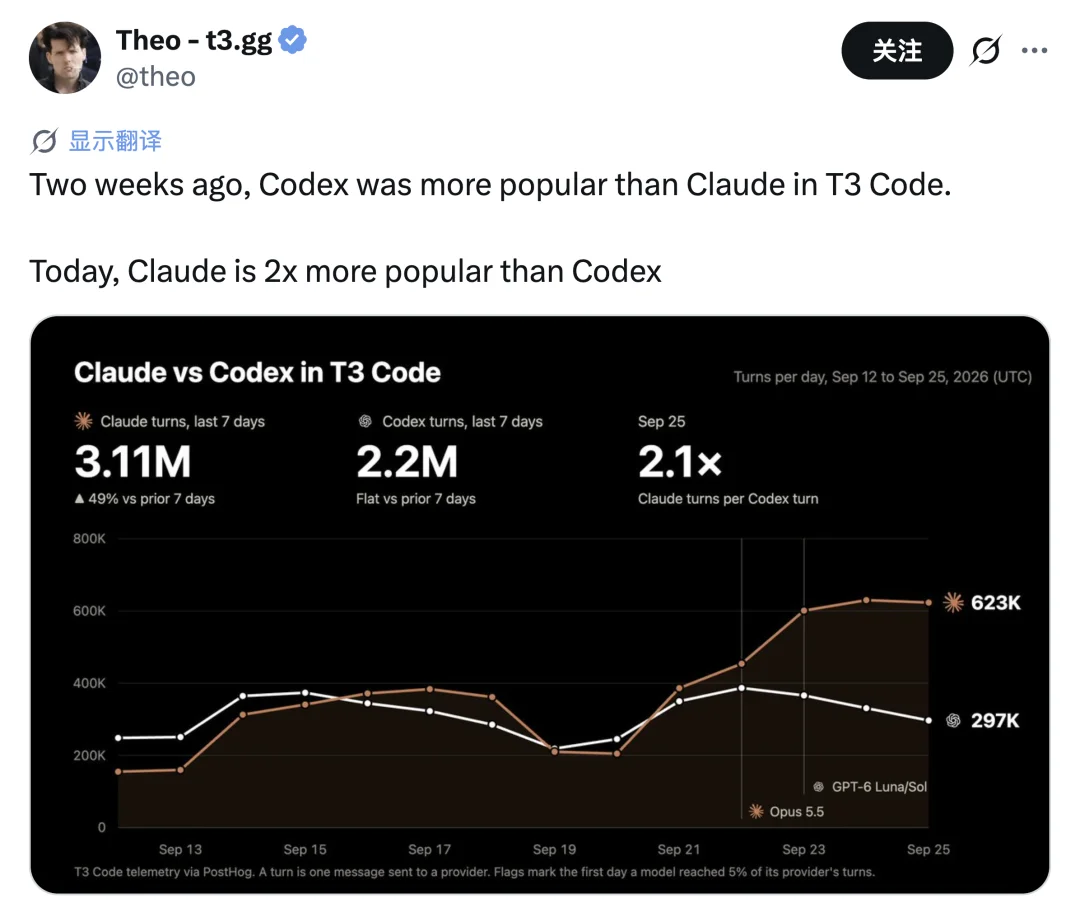
This chart says more than any benchmark: developers follow the better model, and they move fast. What slows a switch is rarely the model itself. It's everything tied to it: the interface you know, the shortcuts, the thread history, a subscription billed per provider.
So our view has long been that you should be able to switch models without switching your interface or your allowance. The allowance half is what CodingPass does. For the interface half, the best option right now is T3 Code.
Our verdict: if you use two or more agents, or often need to watch agents while away from your desk, install it. If you use one provider, live in the terminal, or have a 16 GB machine, you can skip it.
T3 Code is a free, open-source (MIT) workspace for coding agents with 55k GitHub stars. It brings the Claude Code, Codex, Cursor, OpenCode and other agents you're already signed in to into one interface. It doesn't resell tokens; it runs on the subscriptions you already have.
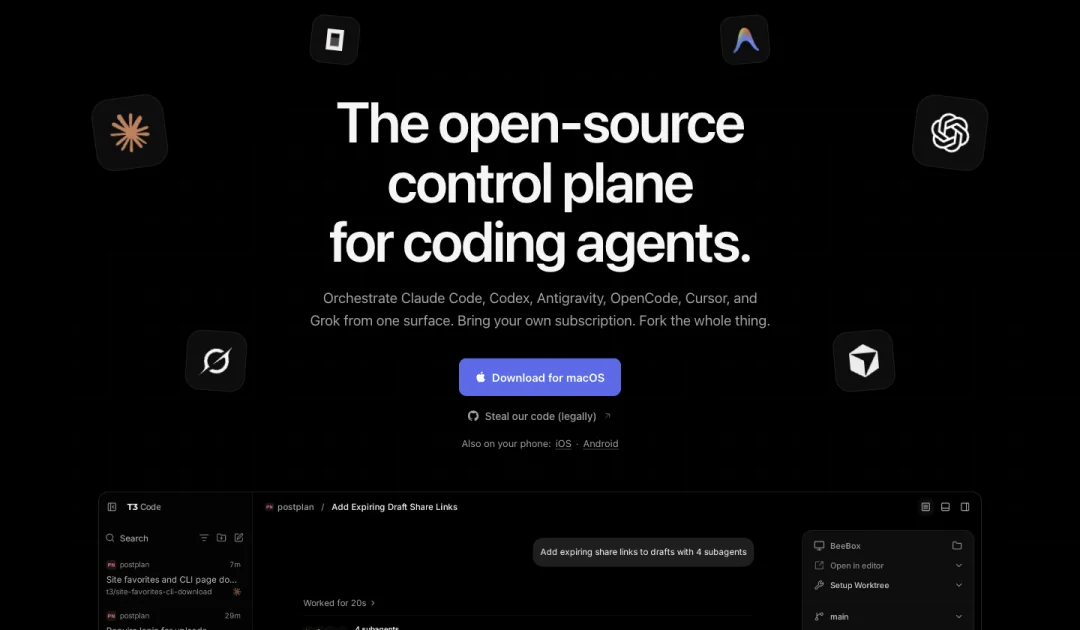
It has a long feature list. We think three things matter, and all three are about not being tied to one provider.
Halfway through a thread, you can switch from Claude to Codex. T3 Code hands the conversation over: short threads transfer intact; long ones keep the recent turns, the original request and command outcomes, and leave references to the rest for the new agent to read when it needs to.
It looks like a small feature, but it changes what switching costs. Moving from Claude Code to Codex used to mean a different app, a new session and explaining the background again, so most people only switched when they had to. Now it's one click in a dropdown, and you use whichever model suits the task. Some users simply switch to the other provider when Claude or Codex runs low on usage.
Note that the handoff carries the conversation, not the previous provider's reasoning or tool-call state. Repeat key constraints after you switch.
The main agent can split a task across subagents from different providers. In the homepage demo, the request is share links for drafts plus one phrase, "with 4 subagents", and the API, tests, docs and button go to Claude, Codex, Muse and Gemini respectively.
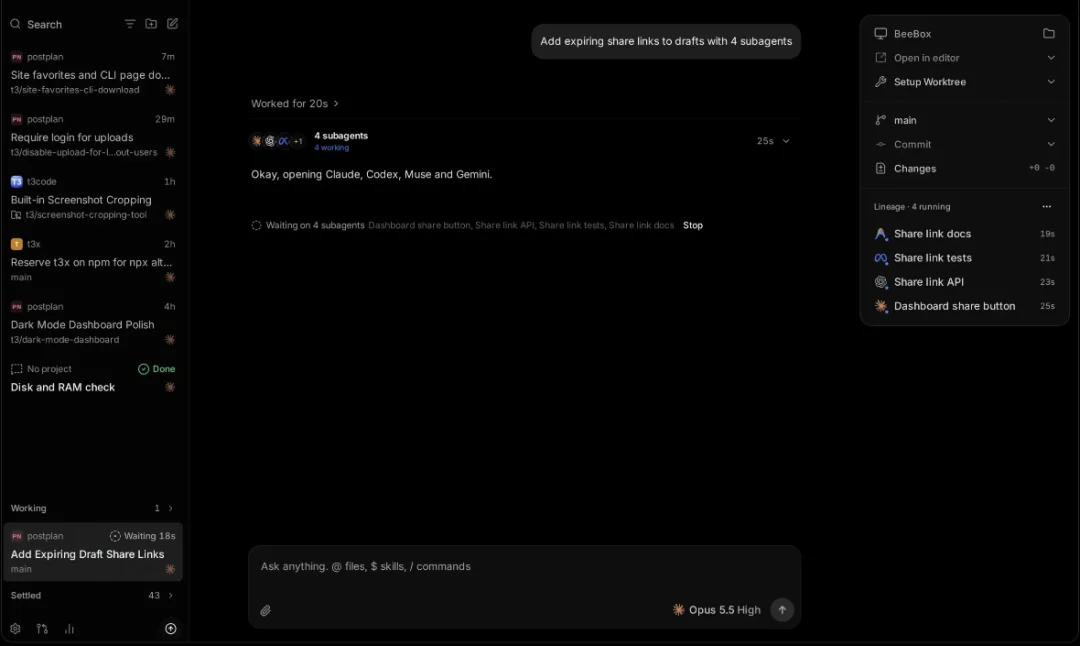
We're measured about this one. Well-split tasks do finish faster, but running several providers in parallel also burns usage several times as fast. Another feature is more useful day to day: Shift-click several models in the model picker and the same request runs once per model, each in its own worktree, so you keep the best result. When you're unsure which provider fits a task, that beats reading benchmarks.
Turn on T3 Connect, sign in on your phone with the same account, and you're connected to your machine at home, with no port forwarding and no Tailscale. When an agent finishes, fails or needs approval, your phone gets a notification. Theo says fewer than 5% of their own prompts run on a laptop.
This is really the same idea as the first two: once the interface is separate from the machine, you keep one workflow wherever you are. Nearly every positive post about it on X mentions the mobile app; one user said tapping around a remote desktop on a small phone screen used to feel "a bit silly".
We don't think it suits everyone. These costs are real.
Memory. T3 Code runs each provider's official client. One user compared it with a lightweight terminal setup that runs 20+ agents in about 1 GB of RAM; T3 Code reaches that at 3 to 5 agents. On a 16 GB machine, that can be the difference between working and the OOM killer.
Not a terminal UI. It looks more like a chat app, closer to the Claude desktop app. If you live in tmux and the keyboard, it takes getting used to, and you may not want to.
Claude's 5-hour limit drains faster. T3 Code drives Claude through Anthropic's Agent SDK, and the official FAQ admits this burns a subscription's 5-hour limit faster than Claude Code itself. Weekly limits are unaffected.
Very fast releases. A stable release every few days, several nightlies a day. If you don't want to tinker, stay on stable.
If you use one provider and never work remotely, these costs buy you nothing. Claude Code's or Codex's own app is enough.
T3 Code separates the interface from the provider, but your allowances are still separate: one Claude subscription, one ChatGPT subscription, each with its own 5-hour window, and when one runs out you wait.
That's the part CodingPass does. Claude and GPT draw from one allowance, metered at official API prices, so switching models doesn't mean switching subscriptions. Connecting it in T3 Code works the same way as the OpenRouter setup in T3 Code's docs: add a separate Claude instance, and your subscription setup stays untouched.
Create a config directory on the machine that runs the agents:
mkdir -p ~/.claude_codingpassAdd a Claude instance. Open Settings → Providers, add a Claude instance, set Binary path to claude and CLAUDE_CONFIG_DIR to ~/.claude_codingpass.
Set the environment variables in that instance's Environment variables:
ANTHROPIC_BASE_URL=https://codingpass.aiANTHROPIC_AUTH_TOKEN=cp-live-… # mark as SensitiveANTHROPIC_API_KEY= # explicitly emptyPick a model. Choose this instance and your model when you start a thread. For a model ID that isn't in the built-in list, use Add custom model in the instance settings.
Codex and OpenCode work the same way. T3 Code reads their own configuration, so set them up with the Codex guide or the OpenCode guide. With an API key, the prompt cache lasts only about 5 minutes. When you come back to a long thread after a break, a Compact chip appears next to the send button; compacting before you send saves a lot of input tokens.
Install and sign in to at least one agent first, for example claude auth login or codex login.
Download the installer from t3.codes or GitHub Releases. Don't use links from search results or AI answers: people have already been sent to the clone at t33.codes.
For remote use, enable T3 Connect on the desktop, then install the iOS or Android app and sign in to the same account.
Claude and GPT, both metered at official API prices. No surprise charges, cancel anytime.