Claude Code setup guide
The three-step setup, plus default models and allowances for each plan.
Add two variables to settings.json and run /status to confirm requests route through CodingPass.
If you only want the three-step quick reference, see the Claude Code setup guide. This post starts with what Claude Code does, then walks through the setup.
Claude Code is Anthropic's own coding agent. It reads your repository, lays out a plan, edits multiple files, runs tests, and inspects terminal output to keep debugging. You can customize it per project:
CLAUDE.md: holds project conventionsThe official docs list four entry points: terminal, IDE, desktop app, and browser. The ones that read settings.json are:
claude commandclaude -p runs a single prompt non-interactivelyThe desktop app is separate: Claude Desktop ignores settings.json and connects via Gateway mode instead—see the Claude Desktop setup guide.
Once connected to CodingPass, Claude Code still uses Anthropic's official model IDs: Go defaults to Sonnet 5.5 (claude-sonnet-5-5), Plus unlocks Opus 5.5, Pro unlocks Fable 5.2, and quick edits can go to Haiku 5.5. Requests are metered against your plan allowance with no surprise charges.
These steps were verified on a fresh VM running Claude Code 2.1.327 with no prior claude.ai login.
Install Claude Code, then open the Keys page in the CodingPass dashboard and create a key with the tool set to Claude Code. The key starts with cp-live-.
Open ~/.claude/settings.json (%USERPROFILE%\.claude\settings.json on Windows), or create it if it does not exist:
{ "$schema": "https://json.schemastore.org/claude-code-settings.json", "env": { "ANTHROPIC_BASE_URL": "https://codingpass.ai", "ANTHROPIC_AUTH_TOKEN": "cp-live-…" }, "model": "claude-sonnet-5-5"}https://codingpass.ai without /v1.model to match your plan: claude-sonnet-5-5 on Go, or claude-opus-5-5 on Plus and above. If you omit it, Claude Code defaults to Opus 5.5.$schema lets your editor highlight mistakes.Once saved, quit any running Claude Code session completely, then run claude inside your project directory.
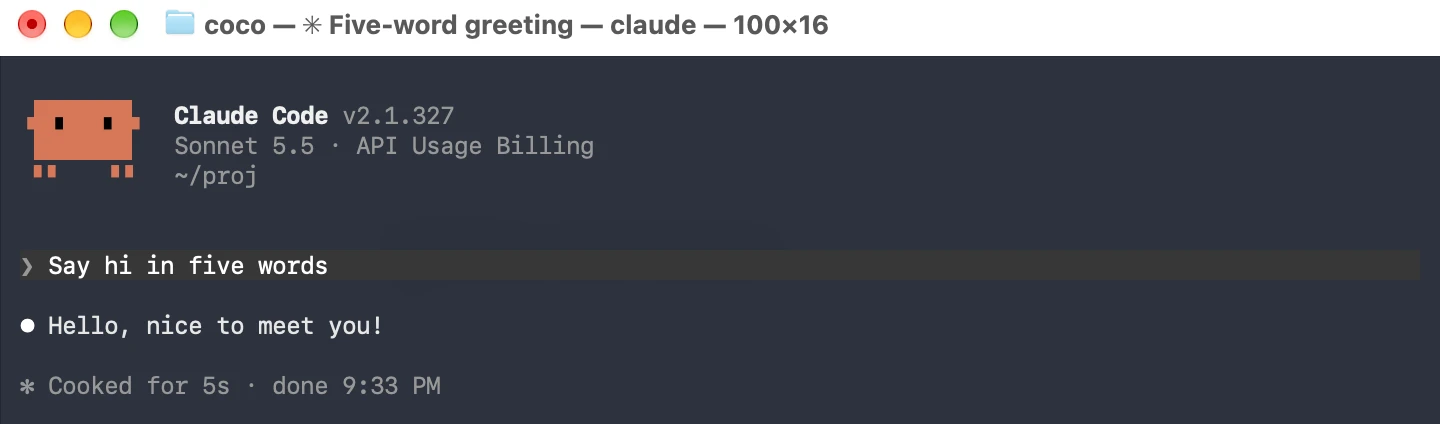
Check the line below the logo: it should show the model name and API Usage Billing. Send a quick prompt—if it replies normally, you are connected.
If you would rather skip the interactive UI, run a single non-interactive command and check that it returns 2:
claude -p "1+1, output only the answer"Then run /status to double-check:
Anthropic base URL: https://codingpass.aiAuth token: ANTHROPIC_AUTH_TOKEN, confirming it is using your CodingPass key rather than an old claude.ai sessionSetting sources: the config files loaded—here, User settings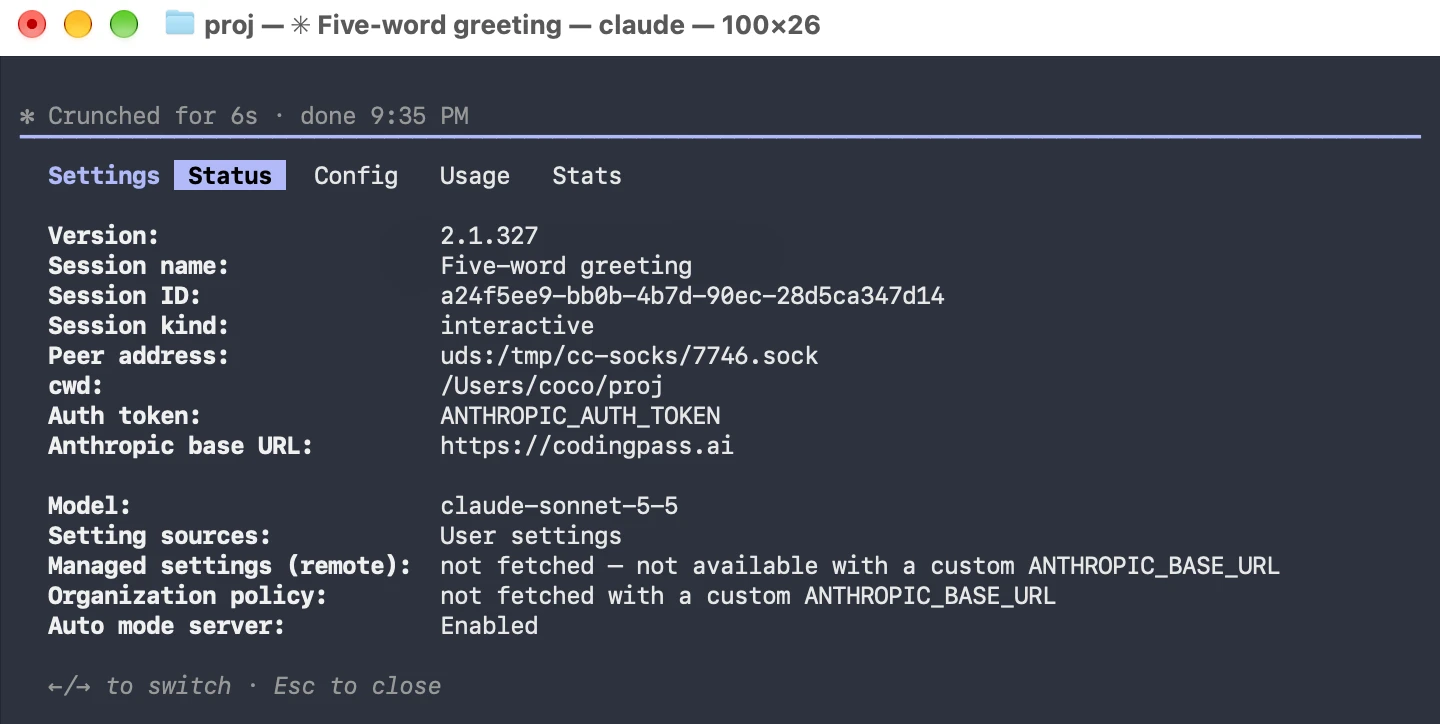
One settings.json, Sonnet 5.5 from