Built-in Gateway mode
Under Developer Mode, Claude Desktop lets you set Inference provider to Gateway. No proxy scripts, no client patches and no separate Claude Pro or Max login required.
Enable Developer Mode, switch Third-Party Inference to Gateway mode, and run Claude Sonnet 5.5, Opus 5.5 or Fable 5.2 inside Claude Desktop on a fixed monthly plan—no claude.ai login or per-token surprise bills.
$10/mo until you cancel.
Inference provider GatewayCredential kind Static API keyGateway base URL https://codingpass.aiGateway API key cp-live-…Gateway auth scheme bearerChat, Artifacts, Projects and local MCP servers—all routed through Claude Desktop’s built-in Gateway mode.
Under Developer Mode, Claude Desktop lets you set Inference provider to Gateway. No proxy scripts, no client patches and no separate Claude Pro or Max login required.
Use Claude Desktop’s native UI—live Artifacts, file uploads, Projects and the Code tab—backed by Sonnet 5.5, Opus 5.5 or Fable 5.2 on your CodingPass plan.
Your local MCP servers in claude_desktop_config.json—filesystems, Git, databases and custom tools—keep working when inference runs through CodingPass.
Because Claude Desktop talks to CodingPass over the native Anthropic Messages API, extended thinking, vision and prompt caching work out of the box.
Every plan works with Claude Desktop’s Gateway mode. Pick the Claude flagship you want; higher tiers include everything below them.
Best forDaily chat, coding, writing and MCP workflows
$10/mo
$60 allowance a month
Best forLarge codebases, complex Artifacts, Opus 5.5
$30/mo
$200 allowance a month
Best forHeavy daily use and the hardest reasoning tasks
$100/mo
$500 allowance a month
Estimates from CodingPass traffic: about 100K tokens per request at roughly 5% input, 1% output and 94% cache read. Long desktop sessions with MCP tools send multiple requests. Allowances are metered at official API prices.
Turn on Developer Mode, fill in the Gateway form once, and relaunch Claude Desktop.
Sign in with Google, GitHub or email and pick a plan. Then go to Dashboard → Keys → New key. Keys start with cp-live-.
You don’t need to sign in to claude.ai. Confirm the dialog, and a Developer menu appears in the menu bar.
Help → Troubleshooting → Enable Developer Mode…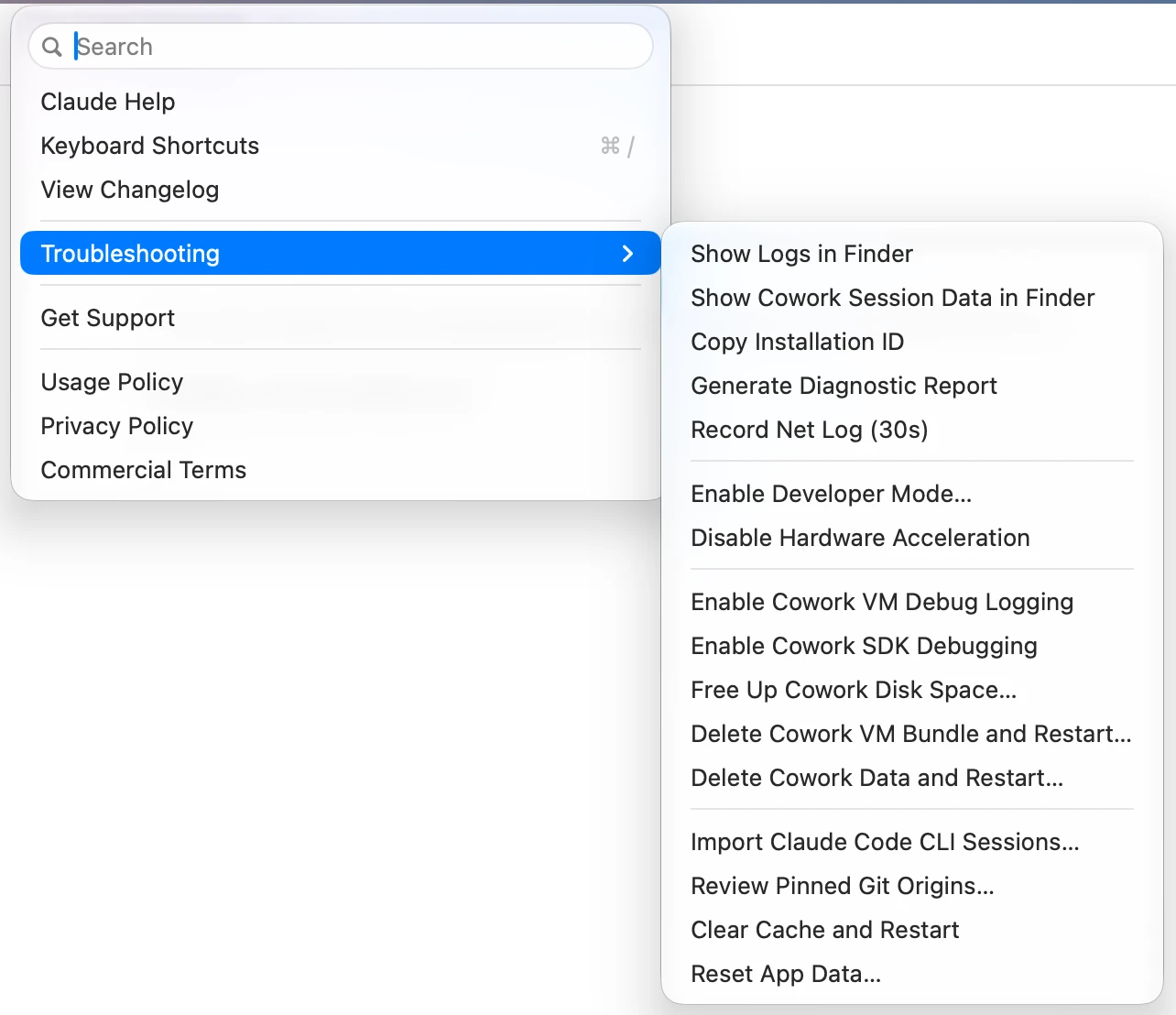
Open Developer → Configure Third-Party Inference…. Gateway is already selected; fill in the four fields below. The base URL has no /v1.
Credential kind Static API keyGateway base URL https://codingpass.aiGateway API key cp-live-…Gateway auth scheme bearer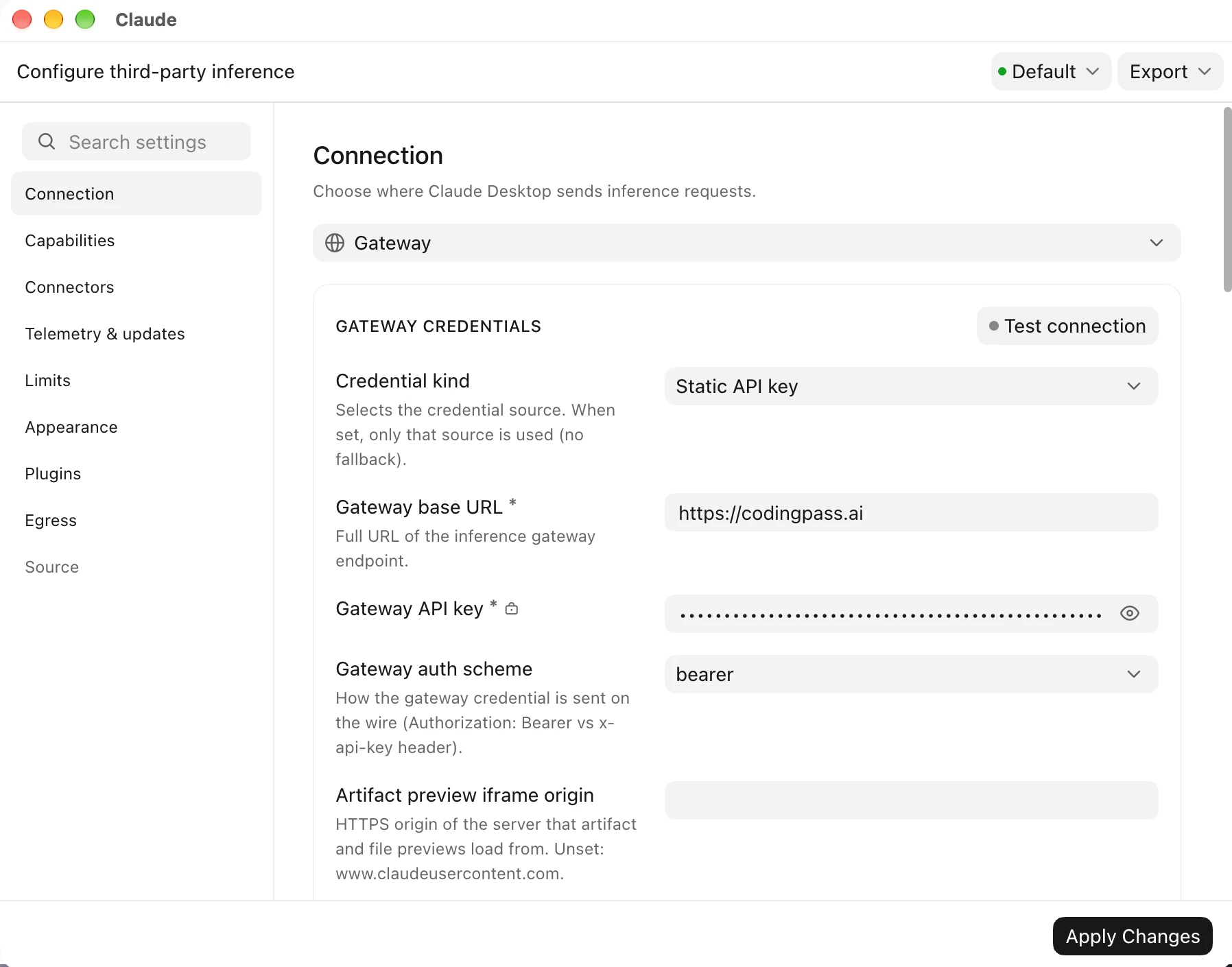
Claude Desktop reopens with Gateway in the bottom-left corner, and the Claude models on your plan are in the model picker. Or import in one click from the CodingPass Keys page using CC Switch.
Apply Changes → Relaunch now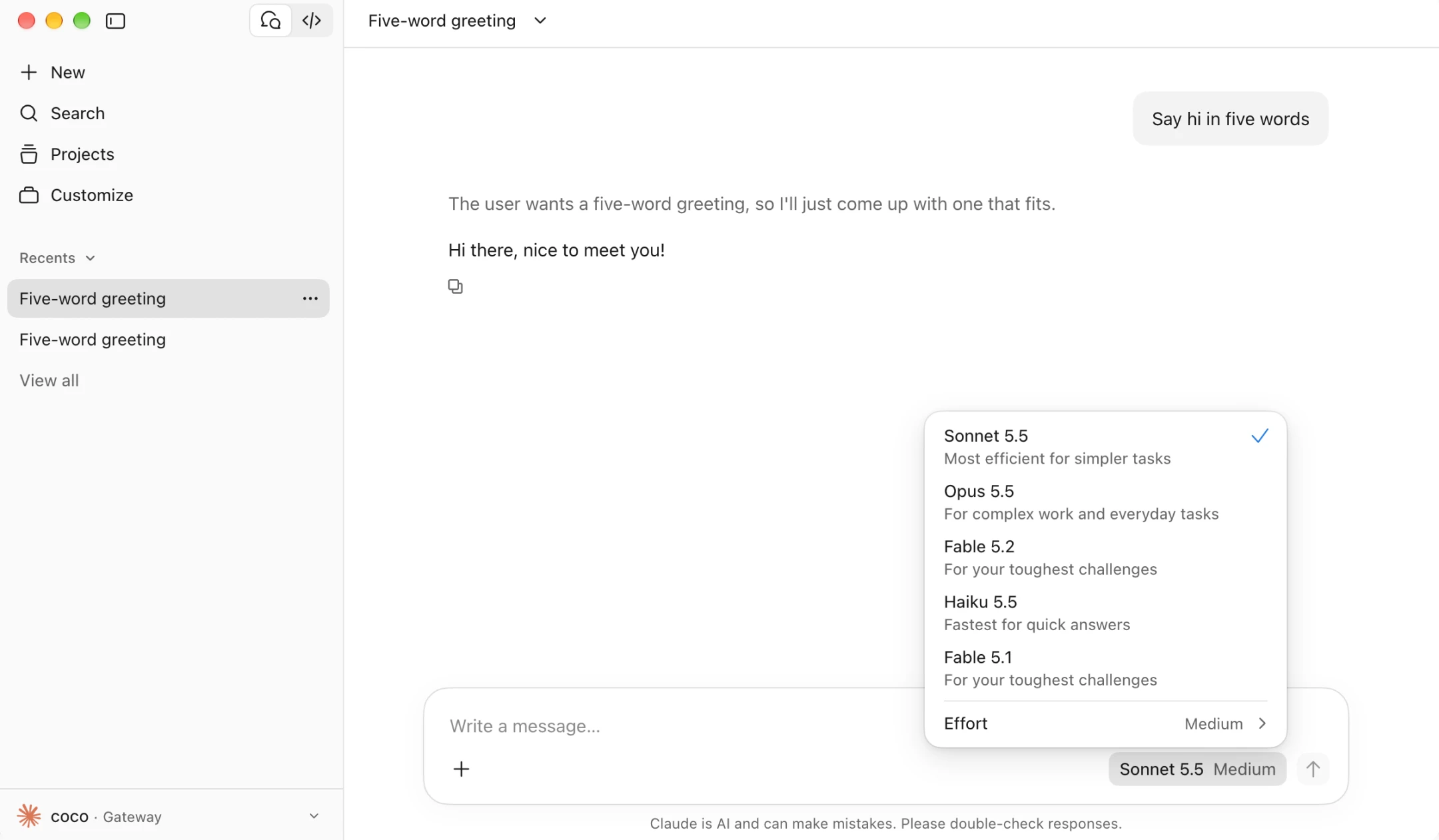
Step-by-step guide with screenshots
Tested with the latest stable release of Claude Desktop 6.6395 on .
One monthly allowance covers every model, with 5-hour and weekly caps. The right model for the task makes it go further.
In Gateway mode, Claude Desktop reads /v1/models and lists every claude-* model on your plan. Use Haiku 5.5 for quick edits and summaries, Sonnet 5.5 for everyday work, and Opus 5.5 (Plus) or Fable 5.2 (Pro) when you need deeper reasoning.
claude-haiku-5-5 # fast, lowest cost per messageclaude-sonnet-5-5 # everyday coding and writingclaude-opus-5-5 # deep reasoning, on PlusIf you also use Claude Code or want to switch between CodingPass and a personal Claude login, click Import to CC Switch on the CodingPass Keys page. CC Switch configures Claude Desktop’s Gateway settings for you and lets you toggle providers in one click.
Dashboard → Keys → Claude Desktop → Import to CC SwitchDeveloper → Configure Third-Party Inference → Gateway) is Claude Desktop’s built-in option to route model requests through your own Anthropic-compatible endpoint instead of a personal claude.ai subscription or Bedrock/Vertex. Pointing it at https://codingpass.ai with a Bearer key keeps your usage on a fixed monthly CodingPass plan with no surprise overage bills.Cmd+Q and reopen). Then check that Credential kind is Static API key, Gateway base URL is https://codingpass.ai without /v1, and Gateway auth scheme is bearer.https://codingpass.ai. Claude Desktop appends /v1/models and /v1/messages itself—adding /v1 sends requests to /v1/v1/messages and fails.claude_desktop_config.json, Artifacts, file attachments, Extended Thinking and Prompt Caching all work over the Gateway. Cache reads are metered at the official cache-read price, keeping multi-turn sessions economical.Sonnet 5.5 from $10 a month via Gateway mode. No surprises, cancel anytime.