T3 Code: One Workspace for Claude Code and Codex
Bring Claude Code, Codex, and other agents into one workspace using your existing subscriptions.
Wrapping the headless CLI or scraping local OAuth tokens in third-party harnesses still risks account restrictions. The supported route is Google's official ACP runtime—built directly into T3 Code and available via agy acp in editors like Zed and JetBrains.
If you have a Google AI subscription or Antigravity access, you may want to stay in your usual editor or multi-agent workspace instead of switching into the Antigravity IDE every time you reach for Gemini. Historically, wrapping the headless CLI or extracting local OAuth tokens for third-party harnesses risked account bans.
In September 2026, T3 Code creator Theo announced Antigravity support via PR #9348. He noted that multiple DeepMind employees confirmed Google does not ban personal subscriptions for third-party clients—provided they run Google's official, unmodified ACP executable with native Google sign-in.
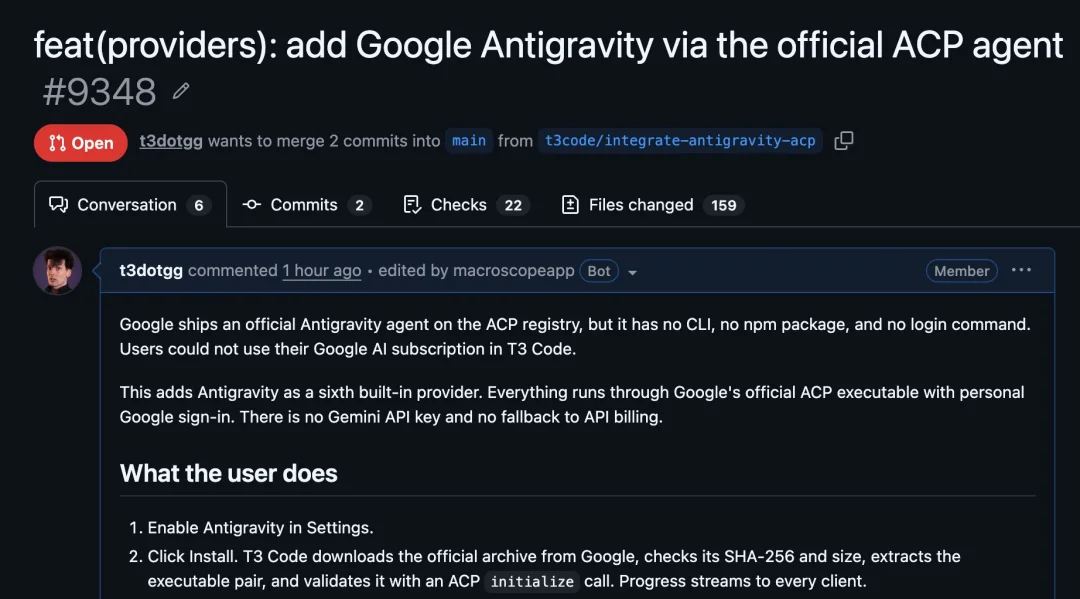
Bottom line: You have two official paths to use Antigravity outside its own IDE. For a turn-key multi-agent workspace with mobile remote access, use T3 Code. To stay inside your existing editor, point an ACP-compatible client such as Zed or JetBrains at agy acp. Unofficial CLI wrappers and credential proxies remain off-limits.
If you already juggle Claude Code, Codex, and Gemini, T3 Code is the quickest setup. It ships Antigravity as a built-in provider with its own managed runtime and isolated GEMINI_HOME profile, so it will not interfere with your local agy CLI configuration.
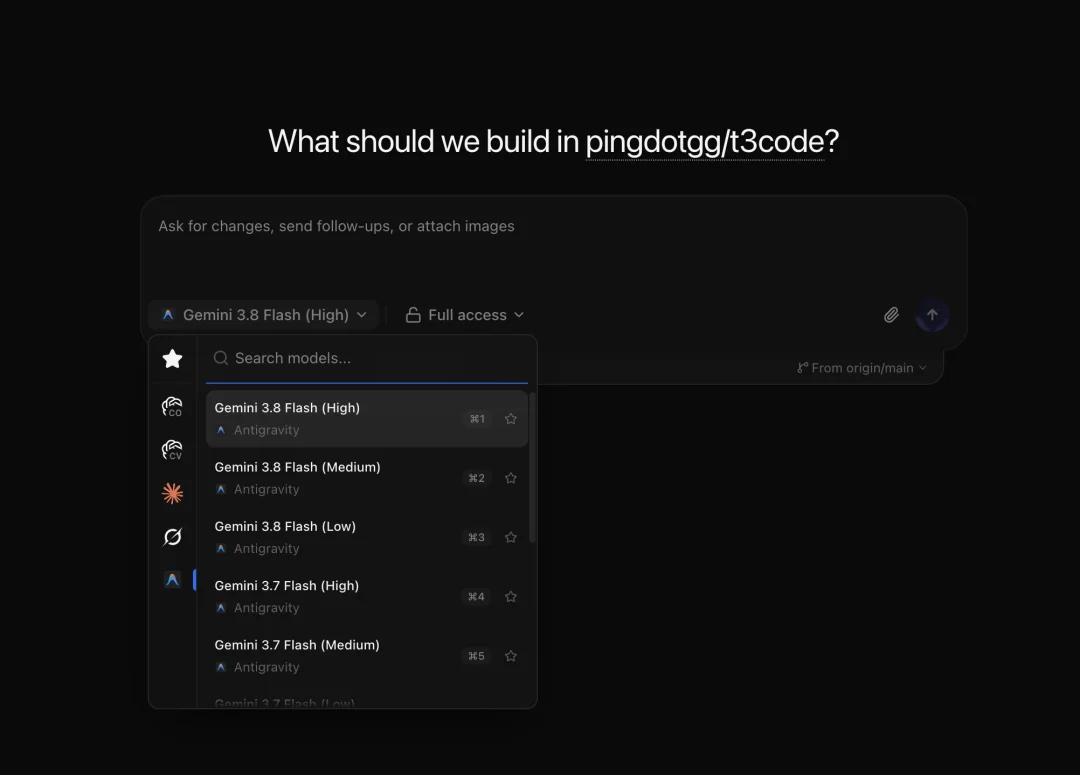
Open Settings → Providers on desktop or web, select the environment running your project, toggle Antigravity on, and click Install. T3 Code downloads the official archive from Google, verifies its SHA-256 hash and size, and extracts it:
If you already maintain the Antigravity CLI on your machine, you can skip the managed download and set Binary path to your local agy executable.
Once the runtime is ready, click Sign in. Each Antigravity instance keeps its own credentials and ignores ambient host environment variables such as GEMINI_API_KEY:
| Method | Credentials and flow | Best for |
|---|---|---|
| Google account | Personal Google OAuth sign-in in your browser | Personal Google AI subscribers (default) |
| Gemini Enterprise | Browser OAuth sign-in plus GCP project and location | Enterprise Gemini seats |
| Gemini API key | API key only, no browser needed (click Connect) | Pay-as-you-go API users |
| Agent Platform / Vertex AI | API key, or GCP project and location with ADC on the host | Google Cloud teams and production setups |
If you start sign-in from a phone or another computer while T3 Code runs on a home machine, Google finishes on a page showing a temporary code (or a 127.0.0.1 callback URL). Paste that code or the full redirect URL into the setup field in T3 Code to complete authentication.
After T3 Code confirms account access, you can pick Antigravity on any new thread:
/plan, /compact, /clear, /goal, and /logoutagy acp in Zed, JetBrains, or other editorsIf you prefer to stay inside your own code editor rather than adopting a separate workspace, the Antigravity CLI ships a built-in agy acp server command.
First verify your CLI supports ACP and sign in:
agy acp --helpagy acp --loginThen register agy with ["acp"] as a custom agent server in your editor. In Zed, add this to settings.json:
{ "agent_servers": { "Antigravity": { "type": "custom", "command": "agy", "args": ["acp"] } }}Open Zed's Agent panel and start a thread with Antigravity. JetBrains IDEs, Android Studio, Xcode, and Neovim plugins (such as avante.nvim and CodeCompanion) follow the same pattern, launching agy acp as a subprocess.
Running Antigravity in external tools relies on what the official ACP runtime exposes today, which comes with a few quirks compared to the native IDE:
.gemini/skills and .agents/skills directories in the workspace (Git ignores empty folders, so they stay out of commits)~/.gemini/config/skills or ~/.gemini/antigravity-cli/skills, not ~/.agents/skills. Project-level skills load in order from .gemini/skills, .agents/skills, and .agent/skillsBoth T3 Code and Zed connect to Antigravity through the Agent Client Protocol (ACP), an open standard backed by Zed Industries and JetBrains. Think of it as LSP for coding agents: the editor or control plane spawns the agent as a subprocess and exchanges JSON-RPC 2.0 messages over stdio (or HTTP and WebSockets for remote hosts) to stream replies, render diffs, and request tool permissions.
ACP sits alongside MCP rather than replacing it—MCP connects agents to tools and data, while ACP connects editors and workspaces to agents. Alongside Google Antigravity, the official ACP Registry already lists Claude Agent, Codex, Cline, Gemini CLI, GitHub Copilot, and OpenCode.
For more on how T3 Code combines Claude Code, Codex, and Antigravity in one workspace, see our T3 Code guide.
Claude and GPT metered at official API rates. No surprise charges, cancel anytime.